Truncating a 1 TB Table in an Availability Group
Years ago, I read a Q&A about the consequences (in terms of latency, log backups, etc.) of truncating a table with billions of rows in an Availability Group. I even wrote my own A to the Q with some measurements, although there was no AG involved in my test. Anyway, I was recently reminded of all that, and realized that AI might make it a lot easier to just test and see what happens.
The Q&A
Here’s the original question: Truncate a table with 17 billion rows in an AG
It does not have very much detail. And in fact, it wouldn’t have drawn my attention, except that the first answer looked like this when originally posted:
Truncate tablecommand truncates rows instantly and does not write deleted rows to transaction log fileHence
Truncate tablecauses no noticeable network traffic between replicas in AG, there will be no huge log backups as a consequence, etc.You might want to consider backup/archive the table with 17 billion rows before doing truncate, just in case that data will ever be needed, as there will be no way to recover it after truncate table command, because deleted rows are not saved to transaction log / log backup file…
This bugged me. It just seemed a little too dismissive about the potential impact on the transaction log file. Plus, the last paragraph is completely wrong. Read some Paul Randal, why don’t you.
Back then, I ended up running some tests on the Stack Overflow sample database, and posting my own answer, showing that a big TRUNCATE could potentially generate a lot of transaction log traffic.
TRUNCATE Logs Extents, Not Rows
TRUNCATE and DROP both execute “immediately” (ish), and a background task deallocates the extents that make up the table’s data. The deallocation of the extents is what gets written to the transaction log. An extent is a block of 8 “pages” of data, which are 8 KB each (thus an extent is 64 KB). A single 8 KB page can hold many rows, depending on the size of the columns in the table.
I learned while originally writing my answer that there are 3 log records written per extent that’s deallocated in this way (1 each to update GAM, IAM, and PFS pages). When I tested that back in 2020 (I was probably running SQL Server 2016 or 2019 - no one in their right mind was using SQL Server 2017), the log records were about 70 bytes each.
Thus, it’s not really the number of rows that determines the impact of this operation. It’s the SIZE of the table. I estimated that a 17 billion row table could result in anywhere from 1 GB to several GBs of log activity, depending on the size of the rows.
Testing for Real - Attempt #1
For this blog post, I first tried to test this on my laptop. My goal was to TRUNCATE a 1 TB table and measure the impact across a few different metrics (disk, network, CPU, and AG-specific things like send and redo queues).
Unfortunately, my laptop is a 7 year old gaming laptop with limited disk space. The best I could really do was a 50 GB table, and this was on my secondary disk - a 5400 RPM HDD.
I had Claude (AI) spin up two SQL Server on Linux containers, load the data on one, configure an Availability Group, allow the data to seed to the other replica, and then I truncated the table and measured the results. Setting this up took a LONG time, and the results were not really that interesting because of the constrained environment.
Testing for Real - Cloud to the Rescue
I’ve never paid actual money to write a blog post. But I was very curious. So I spun up two 8 vCPU (4 core), 64 GB RAM EC2 instances (i4i.2xlarge) with 1.8 TB locally attached NVMe drives. I was then able to load 1 TB of data into the table (25.6 billion rows), which I structured like the dbo.Votes table as in my original answer on Stack Exchange.
Getting prepared for the test took a little while:
- Loading the data took about 78 minutes
- Taking a full backup took another 27 minutes
- Seeding the data to the secondary took another 34 minutes
At this point, I was ready to run the TRUNCATE. Running the statement completed instantly. And the resource effects were immediate too. The entire process (from the statement executing to all redo being complete on the secondary) lasted 88 seconds.
During that 88 seconds:
- CPU on the primary averaged 1.2 cores (so 15% on this 8 core machine)
- CPU on the secondary averaged 2.5 cores (so more like 30%)
- Network traffic averaged ~45 MB / s
- Correspondingly, disk also averaged ~45 MB / s during this time
About 3,900 MB (close to 4 GB) of data was written to disk during this time. I took a log backup after the whole operation was done, and it was 3,892.09 MB (956.61 MB compressed). My measurements from the original Q&A held true on SQL Server 2025, there were 3 log records per extent, at 77.3 bytes per log record.
As far as the AG-specific metrics, the log send queue stayed pretty flat. Redo fell behind continuously until the operation was complete on the primary. At that point, there was close to 1 GB in the redo queue, and it was cleared out / caught up about 20 seconds later. The AGs stayed SYNCHRONIZED throughout the test (the send queue never passed 60 KB, flow control never kicked in).
Here are a bunch of graphs to go along with those numbers, for the visually minded:
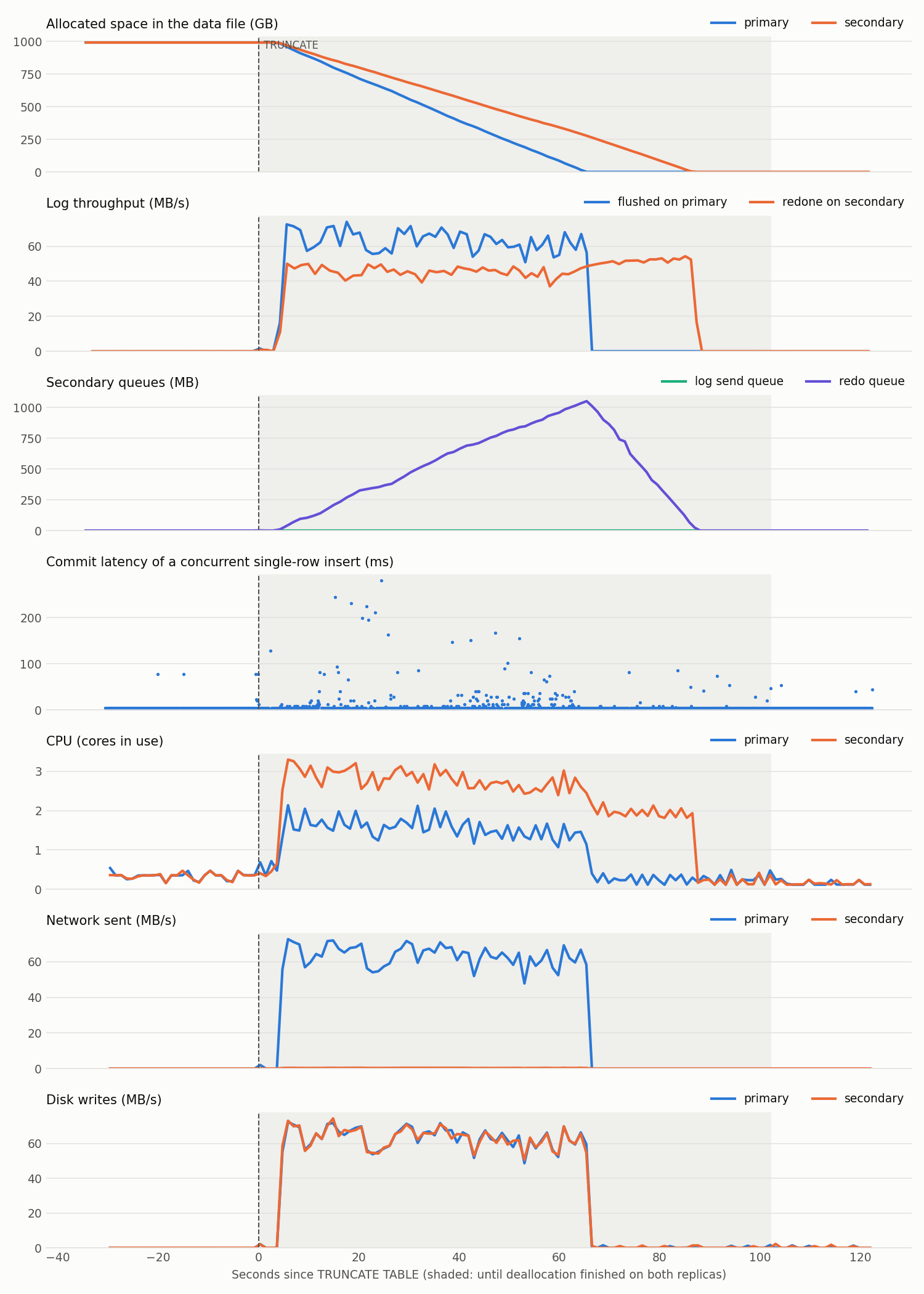
While the cost of this operation isn’t massive, I wouldn’t say it’s nothing either. Hopefully if you have 1 TB tables in your database, you’re running more than 8 vCPUs on your SQL Server instances, and have good disk and network throughput. But…we all know how real life differs from expectations most of the time!
The Surprising Cost of This Test
One amusing thing that I learned from this was how inexpensive it was to run the test I wanted in AWS. I probably used these resources for around 3 hours total - the data load and test itself, plus a couple of smaller test runs before hand to prove out the process and the monitoring scripts. Here’s my AWS bill:

Some Practical Takeaways
A few things that could be useful:
- You can estimate the amount of log generated by a
TRUNCATEas about 3.9 MB of log per GB truncated, roughly 0.4% of the table’s size. This includes nonclustered indexes on the table too, so make sure to account for them. LOB data would also affect this, but I did not test that specifically. - In this specific test, the bottleneck in the AG was redo. The primary wrote deallocation log at about 60 MB/s, but the secondary could only redo it at about 45 MB/s. That’s why the redo queue grew the whole time.
- The secondary is impacted more than the primary (CPU was notably higher on the secondary vs. the primary).
- With the redo queue at 1 GB, if you had to fail over right then, you’d have some time before the database would come online (in this test it was only 20 seconds, but still)
Summary
Overall, I’d say TRUNCATEing a really large table in SQL Server, even in an Availability Group, is probably not something to be TOO worried about. But it’s not free. You might need to account for the additional transaction log activity, log backup size, and CPU / AG lag.